Introduction
Are You Tired of Certificate Management Headaches?
Hey there, developer or small system operator! 👋
You know that feeling when you’re trying to test your system’s TLS setup, or setting up some open-source software, or working with container tools, and you need to manually sign certificates? Yeah, we’ve all been there.
Since you’re working in a development or small internal system environment, security requirements aren’t super strict, but the certificate management process is still a pain:
“Where did I put that CA again?” 🤔 You’ve created so many CAs for different projects, and now you can’t remember which certificate belongs to which CA.
“Wait, when does this certificate expire?” ⏰ You set it up months ago, and now you’re getting TLS errors out of nowhere.
“What was that OpenSSL command again?” 📝 You know you’ve done this before, but the exact command syntax? Nope, it’s gone from your memory.
“Ugh, preparing those config files is so tedious!” 😫 You need to carefully craft those DNS names and domain names, and one tiny typo means starting all over.
“This is killing my productivity!” 😤 What should be a 2-minute task turns into a 20-minute debugging session.
Well, those days are NO MORE! 🎉
Meet Certica - Your TLS Management Superhero
Certica is here to save your day! It’s designed to be dead simple - even a complete beginner can use it. Whether you’re a developer or a small system operator, Certica is your TLS management magic wand.
What does Certica do? Just three things, and it does them brilliantly:
Generate CAs - Create root certificate authorities with ease
Sign Certificates - Issue certificates quickly with the right DNS names and domains
Manage Relationships - Keep track of which certificate belongs to which CA, automatically
How simple is it?
Installation? One command:
pip install certicaUI? Beautiful, intuitive, and works right in your console - no GUI needed!
Command line? One simple command, and you’ve got a certificate ready for testing or simple deployments
Templates? Save your common configurations and reuse them - no more typing the same stuff over and over
The best part? It’s so easy that even a complete beginner can use it. But it’s powerful enough to be a real game-changer for developers and operators managing TLS certificates.
Currently supports Linux only, with full console UI interaction support.
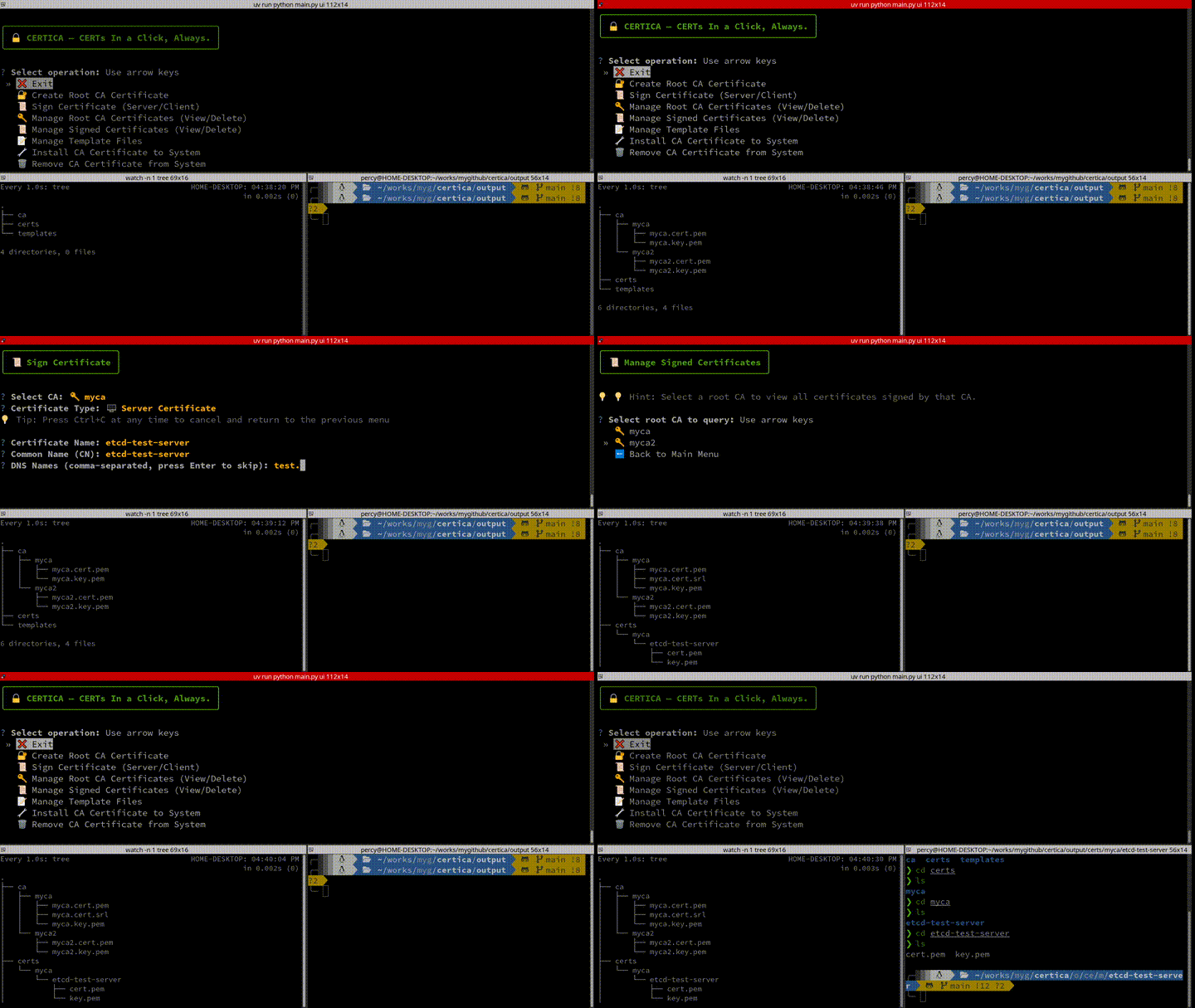
Interactive UI Demo
Here’s what the Certica UI looks like in action:
Key Features
Root CA Creation: Generate self-signed root certificates and private keys
Certificate Signing: Sign server and client certificates with configurable DNS names and IP addresses
Template Support: Save common configurations in templates to reduce repetitive input
Interactive UI: Beautiful terminal graphical interface using Rich library with emoji icons
Command Line Interface: Full CLI support for automation and scripting
System Integration: Install/remove CA certificates from system trust store
Multi-Language: Support for English, Chinese, French, Russian, Japanese, and Korean
Smart Organization: Certificates automatically organized by CA for easy management
Installation Verification: Automatic verification of certificate installation and removal
Multi-Distribution: Automatic Linux distribution detection with appropriate installation methods
Use Cases
Certica is ideal for:
Local web development with HTTPS
etcd cluster certificate management
Docker container certificate generation
Development and testing environments
Any scenario requiring self-signed certificates
Requirements
Python 3.8 or higher
OpenSSL (usually pre-installed on Linux/macOS)
Operating System: Linux (currently Linux only)